Politics, AI, and Markets: Divergent | Analysis by Brian Moineau

Markets on edge: when politics, AI and technicals collide

The opening hook: Markets don’t move in straight lines — they twitch, spasm and sometimes lurch when politics and technology intersect. This week’s action felt exactly like that: a presidential directive touching an AI firm, hotter-than-expected inflation signals and geopolitical jitters combined to push the major indexes below their 50‑day lines — even as equal‑weight ETFs quietly marched to highs. The result is a market with two faces: leadership concentrated in a handful of mega-cap stocks, while breadth measures show a more constructive tape underneath.

What happened, in plain terms

  • A White House move restricting federal use of Anthropic’s AI and related contractor bans rattled investors because it directly ties politics to the AI supply chain and big-cloud platforms. (investors.com)
  • At the same time, a hotter producer-price backdrop and rising geopolitical tensions pushed risk appetite lower, tipping the major indexes below important short- to intermediate-term technical levels (the 50‑day moving averages). (investors.com)
  • Yet equal‑weight ETFs (which give each S&P 500 stock the same influence) were hitting highs, signaling that more of the market — not just the handful of mega-cap names — was showing strength. That divergence (cap-weighted indices weak, equal-weight strong) is crucial to watch. (investors.com)

Why the divergence matters

  • Major-cap concentration: When indexes like the S&P 500 and Nasdaq are buoyed mainly by a few giants, headline readings can mask weakness in the broader market. That’s what cap-weighted indexes do: one or two big winners can hide the rest.
  • Equal‑weight ETFs tell a different story: If an equal‑weight S&P ETF is making new highs, more stocks are participating in the advance — a potentially healthier sign than a rally led by five names. Investors often use this as a breadth check. (investors.com)
  • Technical thresholds (50‑day lines) matter for short-term momentum: many traders and models treat a close below the 50‑day as a warning flag. Seeing major indexes slip below them while equal‑weight funds rally creates a tactical tug-of-war. (investors.com)

The catalysts behind the move

  • Political/AI shock: The Trump administration’s restriction on Anthropic for federal agencies — and related contractor constraints — introduced a direct policy risk to AI vendors and cloud partners. That’s not abstract: it affects large platforms, defense contracting, and the perceived growth runway for AI-oriented businesses. Markets price policy risk quickly. (investors.com)
  • Inflation data and macro noise: Elevated producer prices and the risk that tariffs or geopolitical flareups could keep inflation sticky make the Fed’s path less certain and reduce tolerance for valuation extremes, especially in cyclical and interest-rate-sensitive names. (cnbc.com)
  • Geopolitics and safe-haven flows: Any uptick in global tensions nudges investors toward defense, commodities and some haven assets — and away from crowded growth trades. That dynamic can accelerate short-term rotation. (investors.com)

Where the real strength is: sector and stock themes

  • Memory and AI infrastructure: Semiconductor memory names (Sandisk, Micron, Western Digital) have been bright spots this year, driven by data-center demand for GPUs, memory and AI workloads. Even with headline noise, these parts of the market are benefiting from a secular AI buildout. (investors.com)
  • Stocks to watch ahead of earnings: With earnings season and major reports coming (Broadcom, MongoDB were noted examples in the coverage), traders will pick through guidance and order trends for clues around AI capex and cloud demand. Strong results could re-center the narrative on earnings rather than politics. (investors.com)

Tactical investor implications

  • Watch breadth, not just the headline index: If equal‑weight ETFs are confirming strength, consider using them as a market-health signal. Narrow, mega-cap-led rallies can roll over quickly if the big names stumble. (investors.com)
  • Respect the 50‑day: For many quantitative and discretionary traders, the 50‑day moving average is a key momentum filter. A close below it on the major indexes increases short-term caution. (investors.com)
  • Be selective, watch earnings: Political shocks can be headline-driven and temporary. Focus on companies with durable demand tailwinds (AI, memory, industrials with pricing power). Earnings and guidance will separate transient volatility from real trend changes. (investors.com)

Market psychology and the “policy shock” problem

There’s a subtle behavioral point here: policy shocks — especially those that single out specific firms or technologies — carry outsized psychological weight. They create binary uncertainty (can the company keep selling to government clients?) and can catalyze algorithmic selling, sector rotation and cessation of flows into targeted ETFs. That domino effect can momentarily depress technicals even when the fundamental demand story (e.g., AI infrastructure spending) remains intact. (investors.com)

What I’m watching next

  • Follow-through in equal‑weight ETFs: If they keep rising while cap‑weighted indexes repair and reclaim 50‑day lines, the risk of a broader, sustainable rally improves. (investors.com)
  • Earnings commentary from semiconductor and cloud vendors: Will orders and capex commentary support the memory/AI demand story? Strong guidance could re-center markets on fundamentals. (investors.com)
  • Macro prints: Inflation and jobs data remain the backdrop. Hot prints can amplify policy- and geopolitics-driven selloffs; softer prints can give risk assets room to regroup. (cnbc.com)

Quick takeaways for busy readers

  • Market mood is mixed: headline indices are below their 50‑day lines, but equal‑weight ETFs are making highs — a meaningful divergence. (investors.com)
  • Political moves targeting AI vendors can create outsized short‑term volatility even as the long-term AI investment theme remains intact. (investors.com)
  • Focus on breadth, earnings and macro prints to judge whether this is a temporary tremor or a deeper shift. (investors.com)

Final thoughts

Markets are messy by design — they’re where policy, psychology and profit motives meet. This week’s patchwork action shows why investors should look beyond the headline index and pay attention to breadth signals like equal‑weight ETFs. Political headlines can spark fast moves, but durable trends are usually revealed in earnings, revenue guidance and flow patterns. Keep watch on those real-economy data points; they’ll tell you whether the market’s undercurrent is a blip or the start of something bigger.

Sources


Related update: We recently published an article that expands on this topic: read the latest post.


Related update: We recently published an article that expands on this topic: read the latest post.

Sixty Super Bowls: The Last Pilgrimage | Analysis by Brian Moineau

Sixty Sundays: The friends who’ve never missed a Super Bowl

From $8 seats to $8,000 trips, the Super Bowl has changed almost as much as the men who’ve watched every single one. This year Don Crisman, Gregory Eaton and Tom Henschel — three friends in their 80s — made the pilgrimage again, closing a chapter that began on January 15, 1967. For two of them, this pilgrimage may be the last.

A hook: why this story matters beyond football

There’s something quietly heroic about a ritual kept for six decades: it’s not just about touchdowns or halftime shows, it’s about continuity in a world that keeps speeding up. These men are living archives of the event that became America’s unofficial holiday. Their story asks a simple question: what do we owe our rituals — and to whom?

What happened this year

  • Don Crisman (Maine), Gregory Eaton (Michigan) and Tom Henschel (Florida) attended Super Bowl LX, preserving a streak that began with the very first AFL-NFL World Championship Game in 1967.
  • Crisman, nearly 90, and Henschel, 84 and recovering from a stroke, said this year will likely be their last trip. Eaton, 86, plans to go as long as he can.
  • The trio — once part of a larger “never missed” club that included media members and staff — are now essentially the living end of an era, having scaled back travel from weeklong stays to short trips focused only on the game. (apnews.com)

A little context: how the Super Bowl and fandom evolved

  • The first two championship games were called the AFL-NFL World Championship Game; “Super Bowl” became the common name almost by accident and then by marketing success.
  • Early Super Bowls felt different: cheaper tickets, smaller media machines, less corporate spectacle. Henschel remembers paying $12 for a ticket in 1969. Today, attending the game — travel, lodging, ticket markups — can run into the thousands. (apnews.com)
  • Over 60 editions, the Super Bowl transformed from a championship to a cultural event: halftime megashows, global advertising, and multi-day corporate campus takeovers around host cities.

Why their streak is about more than numbers

  • Ritual and friendship: The three men speak less about specific plays and more about the habit of showing up together. Their annual meetups, brunches and shared travels turned a sporting event into a social anchor.
  • Memory and changing America: Through their eyes you can trace social shifts — from stadium integration and the first Black winning quarterback to the commercialization of sports.
  • The cost of dedication: Their scaling back — shorter stays, tighter budgets — mirrors how the Super Bowl itself has become more expensive and logistically challenging. For them, the decision to continue is a personal calculus of mobility, finances, and how much the ritual still feeds their joy. (washingtonpost.com)

What this says about fandom and aging

  • Traditions adapt. Where once they’d spend a week soaking in the host city, now it’s three or four days and mostly the game. That’s not resignation — it’s pragmatism.
  • The emotional weight of a final trip: Saying “this might be my last” reframes the game as a milestone rather than an event. It’s the closing of a long-running story that others helped write.
  • Public memory vs. private ritual: The Super Bowl is public spectacle; their streak is private devotion made public. It reminds us that the biggest cultural events are made meaningful by countless small, consistent acts of attendance and attention.

Takeaways for readers

  • Small rituals accumulate into identity: attending once is memorable; attending 60 times becomes a life’s thread.
  • Cultural institutions age with us: as the NFL and its marquee event get bigger and pricier, the people who built the memory bank adapt — or fade away.
  • There’s dignity in ending things on your own terms: both Crisman and Henschel acknowledge limits and choose a graceful exit rather than forcing the habit beyond its meaningfulness. (apnews.com)

My take

The story of Crisman, Eaton and Henschel reads like a human-scale novel about time: the highs, the losses, the friendships that outlast careers and changing cities. Sports often give us a truncated narrative — winners and losers — but this trio shows the richer arc: persistence, memory, and the quiet decision to step back when the ritual stops serving who you are. It’s easy to romanticize “never missed” streaks, but the more interesting, humane moment is watching people choose how to end them.

Sources

(Links were checked on February 7, 2026.)


Related update: We recently published an article that expands on this topic: read the latest post.


Related update: We recently published an article that expands on this topic: read the latest post.

Find What’s Really Slowing Your PC | Analysis by Brian Moineau

Why your PC feels slow — and the free tool that actually tells you why

You stare at the familiar bars in Windows Task Manager: CPU 18%, Memory 42%, Disk 0%. Everything looks “fine,” but your cursor stutters, apps freeze for a heartbeat, and videos judder. That feeling — when performance problems refuse to show themselves in plain sight — is maddening. I recently read a hands-on piece about one tiny, free tool that turned that guessing game into something tangible: Process Explorer from Microsoft Sysinternals. It doesn’t just show numbers — it exposes the cause.

A smarter lens on system performance

  • Task Manager gives you a useful headline: how much CPU, memory, disk, and network are currently in use.
  • Process Explorer gives you the byline: which processes or threads are doing the work, which files and handles they have open, what they’re reading from disk, and even whether those processes are known or flagged by security scanners.

Process Explorer is the kind of tool people in IT and power users have relied on for years because it shows the plumbing behind Windows’ behavior. It’s portable (no installation), still maintained by Microsoft, and free. But more than that, it translates confusing symptoms — stutters, periodic freezes, high latency — into observable events you can act on.

How Process Explorer reveals hidden bottlenecks

  • Process tree and parent/child relationships: see which process spawned which, and follow the chain to the real culprit (for example, a browser extension process spawned by a tab).
  • I/O and thread-level details: add columns like I/O Read Bytes, Private Bytes, and active thread CPU to find background disk or thread storms that keep the system busy even when CPU looks low.
  • Lower pane: view open handles and loaded DLLs for any process to find file locks or problematic libraries.
  • System Information window: live graphs for CPU, memory, GPU, and I/O let you spot what spiked first during a slowdown.
  • VirusTotal integration: submit process hashes to VirusTotal and view aggregated antivirus vendor results directly in the tool (handy for spotting suspicious or mismatched binaries).

Those capabilities change troubleshooting from “I think it’s the browser” to “this browser process is doing continuous disk reads because of one tab’s extension — kill it or close the tab and performance returns.”

Quick setup and sensible first steps

  • Download Process Explorer from Microsoft’s Sysinternals site and extract the ZIP — there’s no installer. (Run the EXE as administrator for full details.)
  • Optionally replace Task Manager with Process Explorer (Options → Replace Task Manager) so Ctrl+Shift+Esc opens the richer interface.
  • Add useful columns: I/O Read Bytes, I/O Write Bytes, Private Bytes, CPU Time. They reveal background activity.
  • When you see a slowdown, open View → System Information to check which resource spiked first (CPU, memory, or I/O).
  • Right-click suspicious processes and use “Check VirusTotal.com” to get a quick aggregated scan result (remember: VirusTotal aggregates many engines and can show false positives).

Real-world examples that make it worth the switch

  • A browser kept reading the disk nonstop — Process Explorer showed a specific tab process with huge I/O reads. Closing that tab solved the lag.
  • Defender scheduled a scan of a giant backup folder and caused intermittent spikes. With Process Explorer you can see the pattern and reschedule scans instead of guessing.
  • Explorer.exe hung because a shell extension thread was stuck at 100% CPU. Killing that thread fixed the freeze without rebooting.

Those are the small “Aha!” moments after which your laptop suddenly feels snappier because you can target the root cause rather than spin through generic tweaks.

What to watch out for

  • VirusTotal column: useful, but not infallible. It aggregates many antivirus engines; occasional false positives or API rate limits are possible. Treat results as signals, not definitive judgments.
  • Running as administrator: Process Explorer shows more information with elevated rights. Don’t run elevated constantly unless you need to troubleshoot.
  • Portable means responsibility: because it’s a powerful tool, be careful when killing processes — terminating the wrong system process can affect stability.
  • Malicious software can attempt to hide from or disable diagnostic tools. If Process Explorer behaves oddly (crashes, can’t show details), that could be a sign of deeper infection or of OS-level protections.

When Process Explorer is the right move

  • Intermittent lag without clear resource saturation.
  • Apps that “hang” briefly but recover.
  • Frequent disk spikes that don’t match visible activity.
  • Suspicion of odd or unknown processes, or files running from unexpected locations.

If you regularly fix problems by trial-and-error, Process Explorer will shorten that loop. It makes invisible causes visible.

My take

There’s a difference between seeing metrics and understanding behavior. Task Manager tells you “what,” Process Explorer tells you “why.” For anyone who’s had to play detective on a slow Windows machine, adding Process Explorer to your troubleshooting toolkit is a small step that pays consistent dividends. It won’t replace learning fundamentals (like how memory, I/O, and CPU interplay), but it gives you the facts you need to make sensible fixes — and fewer guesses.

Helpful resources

  • Process Explorer (official Microsoft Sysinternals download and documentation) — authoritative download and feature reference.
  • VirusTotal (overview and public scanning service) — context on how integrated scanning results are sourced and why they should be interpreted carefully.
  • MakeUseOf article that inspired this post — a short, practical write-up showing real examples of using Process Explorer to find causes of slowdowns.

Sources


Related update: We recently published an article that expands on this topic: read the latest post.


Related update: We recently published an article that expands on this topic: read the latest post.

Duck with Dried Cranberries, Tangerines and Mascarpone Sauce | Made by Meaghan Moineau

Duck with Dried Cranberries, Tangerines and Mascarpone Sauce | Made by Meaghan Moineau

Title: A Gourmet Journey: Duck with Dried Cranberries, Tangerines, and Mascarpone Sauce
Description: Discover the art of creating a gourmet dish that marries the rich flavors of duck with the vibrant tang of tangerines and the creamy allure of mascarpone. This recipe takes you on a culinary adventure, perfect for special occasions or impressing loved ones. Plus, delve into a heartwarming family memory that adds a nostalgic touch to this delectable dish. Rated as a 7/10 in difficulty, this main dish promises to elevate your home dining experience.

---


The Culinary Symphony of Duck, Tangerine, and Mascarpone


Cooking is more than just combining ingredients; it's an emotional journey that weaves together flavors, aromas, and memories. Our recipe for Duck with Dried Cranberries, Tangerines, and Mascarpone Sauce is not just a main dish—it's a story on a plate.


Ingredients:


- 2 duck breasts


- Juice of 6 tangerines


- 1 cup mascarpone


- Salt and pepper to taste


- 1 cup dried cranberries


Instructions:


1. Preheat and Prep: Preheat your oven to 350°F. In an ovenproof skillet, heat a light drizzle of oil over high heat. Generously season both sides of the duck breasts with salt and pepper.
2. Sear the Duck: Place the duck, skin side down, in the hot skillet. Cook until the skin is golden brown, about 5 minutes. Flip and sear the other side for an additional 3 minutes.
3. Roast to Perfection: Turn the duck breasts again so they are skin side up. Discard all fat from the pan and transfer to the hot oven. Roast for 10 to 15 minutes until perfectly cooked. Remove from the oven and cover with aluminum foil to keep warm.
4. Create the Sauce: In a small saucepan, combine the dried cranberries with tangerine juice. Cook over medium heat until cranberries soften and the juice reduces. Lower the heat and stir in the mascarpone until it melts and the sauce begins to thicken.
5. Blend to Smoothness: Use an immersion blender to puree the sauce until smooth. Add a splash of duck juices for added depth, mix well, then briefly return to heat to warm through.
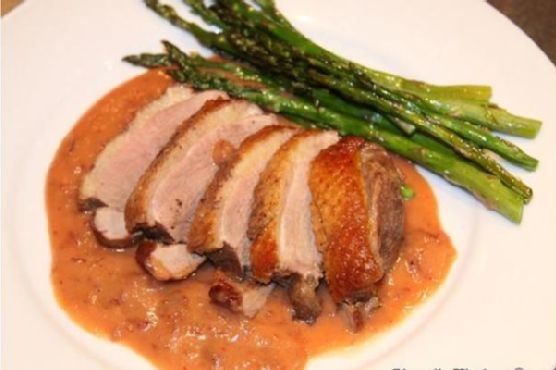
6. Plate and Serve: Spread the velvety sauce on the bottom of a serving plate. Slice the duck and lay it artistically over the sauce.

A Taste of Nostalgia


Growing up, family gatherings were a tapestry of laughter, stories, and indulgent meals. I remember my grandmother preparing duck dishes during festive seasons, her movements a ballet of culinary precision. The kitchen would fill with the zesty aroma of tangerines mixed with the savory richness of duck. It was a scent that meant homecoming and celebration.


One December evening, as snowflakes danced outside, she taught me how to infuse love into every step of cooking. Her secret, she said, was in the sauce—a balance of sweet and savory, just like life itself. To this day, every time I recreate this dish, it transports me back to those cherished moments, where food was the language of love.


---


Difficulty: 7/10
Classification: Main Dish

This exquisite dish demands attention and care, but the reward is a meal that speaks volumes about tradition, innovation, and the joy of sharing good food with family and friends. Embrace the challenge, and let your kitchen become a place where memories are made and cherished anew.

Read more about Appetizers

Read more about Main Dishes

Read more about Desserts