TL;DR
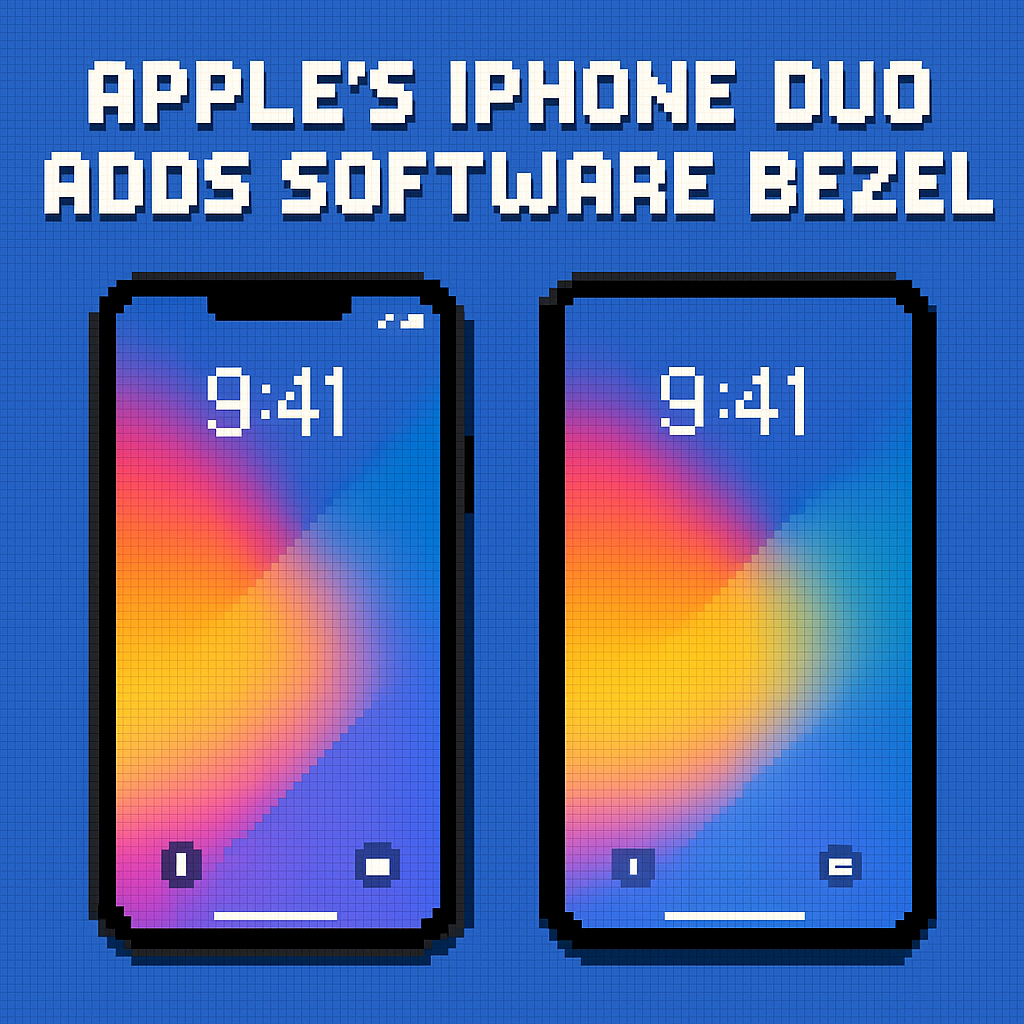
- Apple added an iPhone Duo hidden display setting called “Shift Left Edge” that draws a thin black bezel on the outer screen so swipe‑back still works when a case overlaps the edge, first spotted by Nicolas Lellouche during September 2026 hands‑on time. [1][3]
- This tiny toggle is a big tell: Apple is hardening the Duo’s day‑one UX against third‑party case variance while it seeds a $79–$129 first‑party case lineup announced alongside the $1,999 phone. [2]
- Expect a domino effect—new accessory specs, mirrored options for RTL locales, and copycat “software bezel” toggles on Android foldables within 12 months.
What the source said
MacRumors reports a new “Shift Left Edge” option tucked in iPhone Duo’s Display & Brightness settings. Discovered by blogger Nicolas Lellouche during hands‑on time in September 2026, the toggle roughly doubles the black border along the left edge of the Duo’s outer screen so the iOS swipe‑back gesture functions properly even if a case slightly covers that edge. Apple will sell two official accessories—the iPhone Duo Case and a Folio with Kickstand—and it’s not clear whether they need the setting, which may be aimed at bulkier third‑party cases. Pre‑orders begin October 16 with availability on October 23, according to Apple’s 2026 launch timeline. [1][2][3]
Why it matters
The real stakeholders: buyers spending $1,999 on a first‑gen Apple foldable, and the accessory makers racing to wrap it in plastic, leather, and TPU. When a $40–$90 case interferes with a system gesture, returns spike and word‑of‑mouth sours across carrier channels like AT&T, T‑Mobile, and Verizon. A one‑line software shim that protects Apple’s signature edge‑swipe keeps Duo’s UX consistent across a wild west of cases and kiosks. [2][3]
It also signals how Apple will police foldable ergonomics. Duo’s outer 5.4‑inch screen mirrors the 7.6‑inch inner with the same aspect ratio for “visual continuity,” but continuity dies if a case lip breaks the gesture area on the left edge. This setting is Apple acknowledging, in software, the messy physics of third‑party accessories—before those accessories even ship in October 2026. [2][4]
Original analysis
Contrarian read
- Consensus: “It’s a trivial, cosmetic bezel.”
- My take: It’s strategic OS‑level scaffolding for the Duo accessory economy. Apple just carved out a protected gesture lane so thousands of case SKUs don’t break iOS navigation on a $1,999 phone; that reads like ecosystem risk management, not UI garnish. [2][3]
Three details back this up:
- Timing. Apple is naming prices and colors for first‑party cases (sand/navy Case at $79, taupe/navy Folio with Kickstand at $129) six weeks before launch. A software guardrail today prevents customer‑service headaches on October 23, 2026. [2]
- Scope. The toggle text explicitly references “a case that partially covers the left edge of the outer display,” which is rare frankness about third‑party hardware in Apple UI text shipped in Settings. [3]
- Form factor stakes. Duo’s outer 5.4‑inch and inner 7.6‑inch displays share the same aspect ratio—Apple spent real design capital on continuity; it won’t let a case lip and a broken edge‑swipe ruin it on day one. [2][4]
Named‑stakeholder breakdown
- Apple: Fewer “my swipe back is broken” returns; cleaner day‑one reviews; incentive to push buyers toward first‑party cases that don’t need the toggle and preserve margins in the $79–$129 range. [2]
- OtterBox/Spigen/Casetify: A lifeline. They can build chunkier protective lips without killing the swipe area—market “Shift Left Edge compatible” and ship early SKUs in Q4 2026.
- Carriers (AT&T, T‑Mobile, Verizon): Lower churn risk on ~$83/month installment devices when the primary navigation gesture “just works” even in a mall‑kiosk case. [2]
- App developers: More predictable edge behavior for UIKit gesture recognizers and safeAreaInsets across case tolerances, which reduces regressions in iOS 27 betas. [5]
- Users in RTL locales (Arabic/Hebrew): Today’s toggle is left‑edge only; pressure rises for an automatic mirror or a “Shift Right Edge” option keyed to locale and reading direction documented in the Human Interface Guidelines. [5]
Back‑of‑envelope economics
- Assumptions, not facts: Suppose Apple sells 3,000,000 Duos in the first 12 months (a conservative slice of the premium foldable segment), and 60% of buyers attach a case. If 10% of those choose rugged cases with lip overlap, that’s 3,000,000 × 0.60 × 0.10 = 180,000 users. If even 1% of them would have returned or exchanged the phone over “broken swipe‑back,” that’s 180,000 × 0.01 = 1,800 incidents avoided. At a blended $400 logistics/refurb support cost per incident, the toggle shields 1,800 × $400 = $720,000 in service costs—before reputational drag. Meanwhile, a 25% attach rate to Apple’s own $79–$129 cases on 3,000,000 units yields 750,000 × $79–$129 = $59–$97 million high‑margin accessory revenue. [2]
- The point: One unobtrusive display inset can pay for itself in weeks by reducing friction and steering demand to accessories that never need the toggle.
2×2: Edge protection vs. gesture reliability
- Axes: Case lip coverage (low → high) vs. System gesture reliance (low → high).
- Low/Low (“Vanilla”): Slim shells; gestures rarely hit the edge—no toggle needed (think thin TPU on budget Androids).
- High/Low (“Armor but safe”): Rugged cases on devices with on‑screen back buttons—many Android OEMs like Samsung’s Galaxy Z Fold5 (2023) live here; lip overlap is tolerable.
- Low/High (“Apple’s sweet spot”): Thin cases; iOS keeps the edge clean; swipe‑back feels native on iPhone 15‑series style edges.
- High/High (“Frustration zone”): Chunky cases on iOS edge‑swipe UI; the Duo would live here—unless software draws a sacrificial bezel. “Shift Left Edge” moves Duo from this quadrant back into “Apple’s sweet spot.”
Historical analogue
In 2014, Apple introduced Display Zoom and Reachability alongside larger iPhones like iPhone 6 on iOS 8, admitting—with software—that bigger screens strain thumbs. Those features were preemptive ergonomics patches that normalized a hardware leap; “Shift Left Edge” looks like the 2026 foldable cousin of that approach. Apple’s HIG has long codified safe areas and reading direction, so this fits a decade‑long pattern of OS‑level ergonomics. [5]
What others are missing
The “Shift Left Edge” toggle isn’t just UI sugar; it’s a contract between iOS and the accessory ecosystem. Apple has long told case makers to respect system gestures, but Duo’s book‑style outer screen puts the back swipe millimeters from a hinge and a case seam on the left spine. The toggle formalizes a “gesture reserve” zone that Apple can standardize in updated Accessory Design Guidelines and, potentially, expose to developers as dynamic edge insets via APIs that align with safe areas. That matters because foldables multiply edge states—open, closed, half‑open—and a consistent, OS‑managed gesture lane across those states will make or break Duo’s day‑one usability while reducing QA chaos for app teams targeting iOS 27. [2][5]
What to watch next
- By October 23, 2026, at least three major case brands (e.g., OtterBox, Spigen, Casetify) will market Duo products as “Shift Left Edge compatible” or call out gesture‑safe lips in their product pages.
- By iOS 27.2, targeting December 2026, Apple will add a mirrored “Shift Right Edge” behavior automatically for RTL locales or surface a locale‑aware option in settings.
- By Q3 2027, at least one Android OEM will ship a book‑style foldable with an OS‑level “bezel shift” or “safe swipe area” toggle on the cover display, citing case compatibility in release notes or marketing copy.
My take
This toggle is classic Apple: fix the rough edge before it cuts anyone. On a $1,999 foldable, the back swipe must feel invincible—case or no case. I’d still buy a Duo case that doesn’t need the shim, but I’m glad the shim exists because it telegraphs OS guardianship of the accessory economy. It’s the clearest sign yet that Apple will treat foldables as software problems wrapped in hardware, not the other way around, starting with iPhone Duo’s October 2026 debut. [2][3]
Sources
- iPhone Duo Has a Hidden Display Setting for Case Compatibility — MacRumors — Breaks the news of “Shift Left Edge,” cites discovery by Nicolas Lellouche, describes purpose, and notes timing around hands‑on coverage.
- Apple unveils iPhone Duo — Apple Newsroom — Confirms $1,999 price, October 16 pre‑orders and October 23 availability, and the official Duo Case and Duo Folio with Kickstand (names, colors, prices).
- iPhone Duo can add fake bezel to the outside screen for better case compatibility — 9to5Mac — Details the setting’s on‑device description and shows that it widens the left black border for case clearance.
- 15 things we learned from Apple’s big iPhone Duo and iPhone 18 Pro launch — TechRadar — Notes Duo’s inner and outer displays share the same aspect ratio for visual continuity and lists key dimensions.
- Layout — Apple Human Interface Guidelines (developer.apple.com) — Establishes Apple’s emphasis on safe areas and reading direction, relevant to edge gestures and potential RTL mirroring.
Related update: We recently published an article that expands on this topic: read the latest post.
Related update: We recently published an article that expands on this topic: read the latest post.