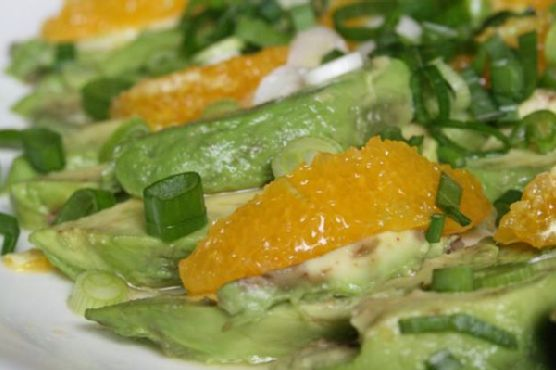
Avocado and Orange Salad With Orange-Ginger Dressing | Made by Meaghan Moineau

Imagine this: it’s midweek, and your brain is fried from a day full of emails and Zoom calls. You open the fridge, and there it is, an avocado teetering on the edge of overripeness and a couple of oranges sitting pretty but untouched. Suddenly, inspiration strikes—why not combine these beauties into a refreshing salad that screams “spring” without actually requiring a season change? This Avocado and Orange Salad, dressed with a zingy Orange-Ginger Dressing, is like a mini-vacation for your taste buds. It’s quick, colorful, and destined to make you fall in love with simple ingredients all over again. Jump to Recipe

What You’ll Need

The beauty of this ingredient list is how effortlessly it combines pantry staples with fresh produce to create something magical.

  • Avocados – Perfectly ripe.
  • Oranges – Sweet and juicy.
  • Green onions – For a hint of sharpness.
  • Orange juice – Freshly squeezed, for that extra punch.
  • Lemon (juice) – To add a bit of zing.
  • Fresh ginger paste – Trust me, it’s worth it.
  • Agave syrup – For a touch of sweetness.
  • Olive oil – Smooth and lush.
  • Salt and pepper – To taste.

How to Make Avocado and Orange Salad With Orange-Ginger Dressing

  1. Begin by slicing your avocados and oranges. Let them overlap on a platter as if they’re chatting at a party.
  2. Don’t waste that orange carcass! Squeeze its juice over your arranged slices, letting it mingle and soften the edges of the avocado.
  3. Sprinkle green onions artfully over the top, like confetti, and add a pinch of salt to awaken those flavors.
  4. Cover the platter with cling film, tucking it into the fridge, so the salad chills out while you prepare the dressing.
  5. In a blender, combine orange juice, lemon juice, fresh ginger paste, agave syrup, and olive oil. Blend until the mixture is smooth and the ginger’s aroma wafts up deliciously.
  6. Season the dressing with salt and pepper, tasting it to find your perfect balance of sweet, spicy, and tangy.
  7. Just before serving, unveil your masterpiece from the fridge and drizzle the dressing generously over the salad.

Cook’s Notes

Here’s the lowdown on making this salad work like a charm:

  • Make sure your avocados are ripe but firm enough to hold their shape when sliced.
  • If you’re making this ahead, keep the dressing separate until just before serving to prevent the avocados from getting too mushy.
  • Leftovers? Unlikely. But if you do have some, store them in an airtight container and consume within a day for best results.
  • Be cautious with the salt. Remember, you can always add more, but you can’t take it out!

Make It Your Own

This salad is versatile enough to play with, so go ahead and shake things up:

  • Swap the oranges for grapefruit slices if you’re after a slightly more tart flavor.
  • Add some toasted almonds or walnuts for a crunchy contrast.
  • For a spicy kick, sprinkle in some red pepper flakes to the dressing.
  • Try a honey drizzle in place of agave if that’s more your style.

If you try this, I’d love to hear how it turns out—drop a comment or tag me! There’s nothing better than seeing your creations light up someone else’s table. Happy cooking!

Related update: Gluten Free Dairy Free Sugar Free Chinese Chicken Salad

iOS 27 Voice Control Signals Smarter Siri | Analysis by Brian Moineau

TL;DR

  • Apple’s 2019 launch of Voice Control in iOS 13 and macOS Catalina, plus 2020’s Screen Recognition in iOS 14, shows the OS can map visible UI to actions—exactly the substrate a more agentic Siri needs. [1][2]
  • Bloomberg reported in March 2024 that Apple discussed bringing Google’s Gemini to iPhone features, implying any “smarter Siri” will blend on‑device work with cloud assist that defines cost and latency trade‑offs. [4]
  • The real moat isn’t a chatbot veneer; it’s Apple’s OS‑level semantic map—accessibility labels in UIKit/SwiftUI and the App Intents framework, introduced at WWDC22—turning taps into addressable actions rivals can’t replicate on iOS. [3][9]

What the source said

Bloomberg’s March 2024 report by Mark Gurman said Apple and Google discussed integrating Gemini into iPhone AI features, including potential Siri enhancements; the piece framed this as complementary to Apple’s on‑device stack, not a replacement. [4]

Apple itself shipped two relevant building blocks years earlier: Voice Control arrived on June 3, 2019 with iOS 13/macOS Catalina as a system‑wide voice interface, and Screen Recognition landed in 2020 with iOS 14 to infer element structure when developers didn’t supply labels. [1][2]

Apple’s developer materials from June 2022 added App Intents, binding app entities and actions into a structured model that Siri, Shortcuts, and Spotlight can call—an explicit signal that per‑app automation would move from ad hoc to first‑class. [3]

MacRumors coverage in 2024 also highlighted a planned Siri redesign with a chat interface and more on‑device processing in iOS 18, aligning with the trajectory implied by Apple’s accessibility and intents investments. [6]

Why it matters

Accessibility users benefit first because robust “what’s on my screen?” interaction reduces mode errors and cognitive load in daily tasks on iPhones and iPads running Voice Control since 2019. [1]

For developers, semantics decide who wins: clear accessibility labels and App Intents make actions discoverable and routable, whereas missing traits push the system into brittle heuristics that feel broken. [3][9]

If cloud assist enters the loop, economics join reliability: every extra round‑trip to Gemini or a peer model adds dollars and milliseconds, shaping which Siri features scale to millions of daily requests. [4][5]

Historically, Apple’s platform wins—Automator in 2005 on Mac OS X 10.4 Tiger and the 2017 Workflow acquisition that became Shortcuts—came from making automation an OS primitive, not a bolt‑on. [8][10]

Original analysis

Apple’s accessibility stack is the agentic scaffold

Consensus says “Siri just needs a bigger LLM.” That’s a half‑truth. The strategic shift is Apple baking an OS‑level semantic model of the UI—via 2019 Voice Control, 2020 Screen Recognition, and 2022 App Intents—so an agent can reference what’s visible and act deterministically. [1][2][3]

Voice Control’s heritage (number overlays, element targeting) and Screen Recognition’s inferred labels imply Apple already maps pixels to selectors when developers fall short, which is the quiet superpower for third‑party apps. [1][2]

Historically analogous moves include Automator in 2005 creating action chains on the Mac and Shortcuts’ rise after the 2017 Workflow acquisition, which normalized user‑authored automations across iOS by 2018. [8][10]

The contrarian read: a “chatty” Siri matters less than a boringly reliable action layer; once taps become addresses, any competent model can orchestrate them, and Apple’s review‑enforced semantics keep that layer consistent. [3][9]

Back‑of‑envelope: the Gemini bill for “Siri that actually does stuff”

Assume Apple blends on‑device parsing with selective cloud calls, per Bloomberg’s 2024 reporting on Gemini talks. [4]

Working from publicly cited Gemini API prices: roughly $1.25 per 1M input tokens for 1.5 Pro and $0.075 per 1M for 1.5 Flash; output tokens often run 3–5× input cost, per industry summaries. These are proxies; Apple’s deal will differ. [5]

Scenario math (assumptions stated and shown):

  • Users: 1,000,000 people/day invoking agentic Siri twice (2,000,000 invocations/day).
  • Tokens per invocation: 3,000 input + 500 output (moderate, multi‑step task).
  • Input tokens/day: 2,000,000 × 3,000 = 6,000,000,000 → 6,000 “million‑token” units → 6,000 × $1.25 ≈ $7,500/day (if Pro‑class input). [5]
  • Output tokens/day: 2,000,000 × 500 = 1,000,000,000 → 1,000 units → if output costs 3× input rate, ≈ $3.75 per 1M → ~$3,750/day. [5]
  • Total: ≈ $11,250/day per 1M daily users → ≈ $4.1M/year; scale linearly to 50M daily users and you reach ≈ $205M/year.

Even with Flash‑tier calls, prompt compression, or on‑device summarization, a popular feature risks nine‑figure OpEx, which makes reliability and scope control first‑order product decisions, not polish. [5]

Named‑stakeholder breakdown (what this means for them)

  • Apple
    • The moat is the OS action layer: accessibility semantics plus App Intents shipped at WWDC22. Ship reliability and you minimize cloud fallbacks; miss, and token burn rises alongside latency. [3][5]
  • Google Cloud
    • A Gemini deal would bring sustained “agent minutes” rather than spiky chatbot traffic; Apple will optimize prompts to cut token counts, squeezing margins unless value‑based pricing emerges. [4][5]
  • Third‑party app developers
    • Accessibility labels, traits, and intents become growth levers; if Siri can’t find your “Add to cart” or “Post comment” intent, your competitor wins the invocation in Spotlight or Shortcuts. [3][9]
  • Regulators in the U.S. and EU
    • A brokered Siri that can route to multiple assistants (as reported) defuses “default” concerns under regimes like the DMA while keeping Apple in control of entry points. Watch how third‑party models access intents. [4]
  • Accessibility community
    • Immediate, concrete benefits accrue on devices from 2019 onward that run Voice Control; this cohort will surface edge cases (fatigue, dexterity, noisy rooms) that harden the on‑screen model. [1]

2×2: How Apple could roll out an agentic Siri

  • Axis 1: Execution locus (On‑device vs. Cloud‑assist).
  • Axis 2: Entry point (Accessibility‑first vs. Mainstream‑first).

Quadrants:

  • On‑device × Accessibility‑first: Voice Control (iOS 13, 2019) and Screen Recognition (iOS 14, 2020) deliver fast, private, deterministic targeting. [1][2]
  • Cloud‑assist × Accessibility‑first: When on‑device parsing fails, server‑side vision or ASR can backstop captioning and descriptions; Apple has shipped hybrid approaches in media apps.
  • On‑device × Mainstream‑first: App Intents‑driven Shortcuts and Spotlight actions (WWDC22 onward) cover quick local tasks with typed or spoken triggers. [3]
  • Cloud‑assist × Mainstream‑first: A “Siri agent” that reasons across apps with selective Gemini calls, as discussed in 2024 reporting, likely launches with usage caps and clear disclosure. [4][6]

The bet: start in the top‑left where Apple’s silicon and privacy story shine, then expand diagonally as reliability and unit economics improve. [1][2][5]

What others are missing

Coverage often fixates on a chat UI and model brand, but the plumbing matters more: Apple is turning accessibility metadata—labels, traits, and hints—plus App Intents domains into a de facto automation DSL that any compliant app inherits. [3][9]

Because Screen Recognition can infer structure when labels are missing, the system gains resilience across older apps, while review guidelines nudge new apps to expose entities and actions cleanly. That architecture removes the need for one‑off bot integrations and makes Siri’s competence scale with conformance. [2][9]

What to watch next

  1. By June 8, 2026: Apple demos Siri completing a multi‑step task across at least two third‑party apps in one request during the WWDC keynote, and explicitly marks the feature “beta” on a slide or in a footnote.

  2. By June 12, 2026: Apple posts WWDC sessions and docs expanding App Intents domains to cover at least one new commerce or social action category, verifiable in Developer Documentation change logs.

  3. By December 31, 2026: Natural‑language Voice Control expands beyond English to at least one additional language/locale listed on Apple’s public support matrices.

My take

Apple picked the right hill. “Agentic Siri” won’t be won by the cleverest model voice—it will be won by the OS that turns any pixel into a reliable action, the way Automator did for Mac tasks in 2005 and Shortcuts did for iOS workflows after 2017. [8][10]

If Apple ships a ruthlessly reliable action layer grounded in 2019–2022 primitives and adds cloud assist only where needed, Gemini becomes an accelerant, not a crutch—and Siri starts feeling like iOS itself waking up. [1][2][3][4]

Sources

  1. Apple Newsroom — “Apple introduces Voice Control in macOS Catalina and iOS 13” (June 3, 2019) — Establishes system‑wide Voice Control origins and scope across Apple platforms.

  2. Apple Developer Documentation — “Screen Recognition” (iOS 14, 2020) — Details on‑device inference that identifies UI elements when accessibility labels are missing.

  3. Apple Developer — “App Intents” (WWDC22 session and docs, June 2022) — Explains the framework linking app entities/actions to Siri, Shortcuts, and Spotlight.

  4. Bloomberg — “Apple in Talks With Google to Bring Gemini AI to iPhone” by Mark Gurman (March 2024) — Reports discussions that frame potential cloud assist for Siri.

  5. TechTarget — “Google Gemini pricing and models explained” (2024) — Provides indicative token pricing for Gemini 1.5 Pro and 1.5 Flash used in cost estimates.

  6. MacRumors — “iOS 18 to Feature Revamped Siri With On‑Device AI” (2024) — Summarizes expected Siri redesign and greater on‑device processing.

  7. Apple Newsroom — “Apple announces WWDC24 for June 10–14” (March 26, 2024) — Confirms Apple’s June WWDC cadence used for dating predictions.

  8. Wikipedia — “Automator (software)” (first released with Mac OS X 10.4 Tiger in 2005) — Historical analogue for OS‑level automation on the Mac.

  9. Apple Human Interface Guidelines — “Accessibility” (ongoing) — Documents labels, traits, and patterns that form the semantic substrate for automation.

  10. The Verge — “Apple acquires Workflow, the iOS automation app” (March 2017) — Context for Shortcuts’ lineage and Apple’s automation strategy.


Related update: We recently published an article that expands on this topic: read the latest post.

Curried Chicken Roll-Ups | Made by Meaghan Moineau

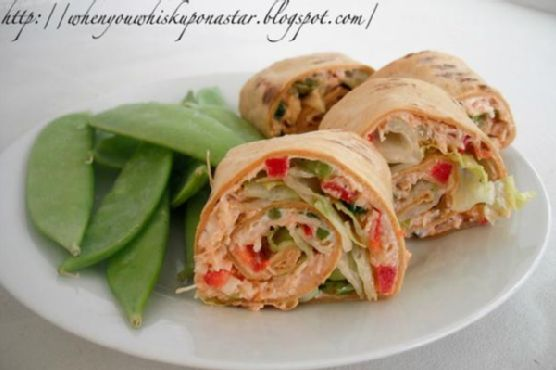
It was one of those nights where dinner plans were nonexistent and I was staring at the contents of my fridge, hoping for inspiration to strike. You know the kind of night where the thought of cooking something complicated is just… ugh. Enter the hero of this tale: Curried Chicken Roll-Ups. They’re quick, they’re easy, and they have just the right amount of zing to make you feel like you’ve put in way more effort than you actually have. These roll-ups are like a little flavor vacation on a weeknight—tangy, crunchy, and creamy all in one bite. Plus, they’re perfect for using up random bits of veggies you’ve got lounging about.

Jump to Recipe

What You’ll Need

Surprisingly, you probably have most of these ingredients chilling in your fridge or pantry right now, just waiting to be turned into something fabulous.

  • 1 can of chicken breast
  • 1/2 cup diced cucumber
  • 1/2 cup diced red bell pepper
  • 1/2 cup diced celery stalk
  • 2 tablespoons chopped green onion
  • 1/4 cup light mayonnaise
  • 1 tablespoon lime juice
  • 1 tablespoon red curry paste
  • 1/2 teaspoon garlic powder
  • 1/4 teaspoon paprika
  • 1/4 teaspoon chili powder
  • Salt and pepper to taste
  • 4 whole grain tortillas
  • 1 cup shredded lettuce

How to Make Curried Chicken Roll-Ups

  1. In a large bowl, place all the ingredients except for the tortillas and lettuce. Stir everything until it’s nicely mixed, and any large pieces of chicken have broken down into shreds.
  2. Heat a skillet over medium and lightly toast or warm your tortillas. You’re looking for them to be pliable and just a tad crispy, which makes rolling them up so much easier.
  3. Scoop out a quarter of your chicken salad mixture and spread it evenly over the top of one tortilla. It should cover the tortilla pretty much edge to edge.
  4. Sprinkle a quarter of your lettuce on top of the chicken salad. It’ll add that fresh crunch we’re all about.
  5. Gently, and I mean gently, roll up your tortilla as tightly as you can without tearing it. Think burrito, but more delicate.
  6. Take a serrated knife and carefully slice the roll into 4 or 6 pieces, depending on your desired serving size. Serve immediately or stash them in the fridge for later munching.

Cook’s Notes

These roll-ups are great for a make-ahead lunch because they hold up well without getting soggy. Just keep them wrapped in plastic wrap or a sealed container in the fridge, and they’ll be good for up to 3 days. If you’re a prep-ahead wizard, you can mix the chicken salad the night before, and it’ll be even tastier as the flavors meld overnight. One thing to watch out for: Make sure your tortillas are fresh and not too dry, or they’ll crack when you roll them. If you’re feeling fancy, you can even warm them with a dab of butter!

Make It Your Own

  • Swap the chicken for crispy tofu for a vegetarian twist. Just give it a quick sauté to ensure it’s nice and golden before adding it to your mix.
  • Add sliced avocado right on top of the lettuce for extra creaminess and a touch of luxury.
  • Use a spicy mayo instead of plain light mayo if you’re into a bit more heat and tang.
  • Try spinach leaves instead of lettuce for a bit more nutritional punch without sacrificing crunch.

If you try this, I’d love to hear how it turns out—drop a comment or tag me in your roll-up adventures! Happy rolling, friends!

Related update: Curried Chicken Roll-Ups

Related update: Fresh and Simple Swai Ceviche

Roast Chicken with Apples and Rosemary | Made by Meaghan Moineau

It was one of those fall evenings when the air felt crisp enough to warrant something warm and homely. I was rummaging through my pantry, looking for inspiration, when I spotted a basket of apples I’d forgotten about. That’s when it hit me: roast chicken with apples and rosemary. It’s a dish that sounds grand but is deceptively simple. Perfect for those days when you want the aroma of something wonderful wafting through your home, without spending hours in the kitchen. Trust me, the combination of sweet apples, aromatic rosemary, and the tangy kick from lemon balsamic vinegar makes this a dish you’ll want to repeat. It’s like autumn on a plate.

Jump to Recipe

What You’ll Need

I adore this recipe because you likely have most of these ingredients lounging in your kitchen already. Here’s what you’ll need to gather:

  • Fresh apples
  • Onions
  • Garlic
  • Fresh rosemary
  • Lemons
  • Raimondo Sicilian lemon balsamic vinegar
  • Seasoning for a rub (salt, pepper, maybe your secret mix?)
  • Roasting chickens
  • Canned stock

How to Make Roast Chicken with Apples and Rosemary

  1. Preheat your oven to 400°F. Set a rack in the lower third of the oven to allow for even heat distribution.
  2. Rinse the chicken under cold water, then pat it completely dry with paper towels. This step is crucial for crispy skin.
  3. In a shallow roasting pan, arrange the apples, rosemary, three lemons (halved), onions, and garlic in a single layer. Season generously with salt and pepper. Toss everything together, then drizzle with the lemon balsamic vinegar.
  4. Rub the chicken with your seasoning mix until well coated. Place it breast-side-up on top of the apple and rosemary mixture. For added flavor, stuff some of the apple and onion mix inside the chicken cavity.
  5. Roast the chicken for about 30 minutes until the breast feels firm and starts to brown slightly. The aroma will start making its way into every nook of your home.
  6. Using tongs, flip the chicken over, breast-side-down, and let it roast for another 20 minutes. This helps the chicken cook evenly and the skin to attain a beautiful golden color.
  7. The chicken is done when a thermometer inserted into the thickest part reads 175°F. Tilt the chicken to let the cavity juices drain into the pan, then transfer it to a cutting board to rest.
  8. Spoon off any fat from the roasting pan, then place it over high heat. Add the canned stock, scraping up all those tasty browned bits. Squeeze in the juice of the last lemon to brighten up the sauce.
  9. Carve the chicken and serve it with the apples and onions, passing the chunky jus at the table. Enjoy the applause from your dinner guests!

Cook’s Notes

Let’s chat about making this dish your best friend in the kitchen. First off, drying the chicken well is key; moisture on the skin is the enemy of crispiness. When flipping the chicken, be gentle to keep the skin intact. If you’re in a hurry, you can prepare the apple and rosemary mix ahead of time and store it in the fridge until you’re ready to roast. Leftovers make fantastic sandwiches or can be tossed with some greens for a vibrant salad. Store any extras in an airtight container in the fridge for up to three days. Reheat gently to avoid drying out the meat.

Make It Your Own

Here are a few ideas to tweak this dish to your liking:

  • Swap in pears instead of apples for a slightly different fruity twist.
  • Use thyme or sage in place of rosemary if that’s what you’ve got on hand.
  • Try a white wine vinegar instead of lemon balsamic for a milder acidity.
  • For a vegetarian version, use crispy tofu in place of chicken and adjust cooking time accordingly.

If you give this roast chicken a whirl, I’d love to see your masterpiece! Drop a comment below or tag me on social media. Cooking is always more fun when shared, don’t you think? Happy roasting!

Related update: Roast Chicken with Apples and Rosemary

Related update: Curried Chicken Roll-Ups