
It was one of those chaotic Tuesday afternoons when everything seemed to be happening all at once. My inbox was overflowing, the laundry was threatening to become a second couch, and the dog was doing her best to convince me that she hadn’t been fed in weeks with those soulful eyes. As I rummaged through my pantry, I stumbled upon a forgotten stash of chocolate chips and suddenly, the only logical thing to do was to bake. Enter: Neiman Marcus Oatmeal Chocolate Chip Cookies. This recipe is that perfect balance between a comforting classic and a little twist that makes it feel special. It’s the kind of cookie that makes a regular Tuesday feel like a mini celebration. And the best part? These cookies are incredibly easy to whip up, even when life feels a bit like a juggling act.
Jump to Recipe
What You’ll Need
Trust me, chances are you already have most of these hanging out in your kitchen, just waiting to become something amazing.
- 1 cup unsalted butter, softened
- 1 cup granulated sugar
- 1 cup brown sugar, packed
- 2 large eggs
- 1 teaspoon vanilla extract
- 2 cups all-purpose flour
- 2 ½ cups blended oatmeal (measure before blending)
- ½ teaspoon salt
- 1 teaspoon baking powder
- 1 teaspoon baking soda
- 12 ounces chocolate chips
- 1 4-ounce chocolate bar, grated
- 1 ½ cups chopped walnuts
How to Make Neiman Marcus Oatmeal Chocolate Chip Cookies
- Preheat your oven to 375 degrees F. The anticipation of warmth is part of the magic.
- In a large bowl, cream together the butter, granulated sugar, and brown sugar until the mixture is light and fluffy. You’re aiming for a dreamy, creamy consistency here.
- Add in the eggs, one at a time, and beat until just incorporated. Don’t forget the vanilla — it’s the unsung hero that ties everything together.
- Gradually mix in the flour, blended oatmeal, salt, baking powder, and baking soda. The dough will start to smell like a promise of good things to come.
- Fold in the chocolate chips, grated chocolate bar, and walnuts. You’ll want to use a spatula to make sure everything is evenly distributed and each scoop is a treasure trove of goodies.
- Roll the dough into balls and place them about two inches apart on a cookie sheet. This gives them room to spread and become their best cookie selves.
- Bake for about 10 minutes. Keep an eye out for those edges to turn golden and the aroma to fill your kitchen. That’s when you know they’re ready.
Cook’s Notes
Let’s be real — these cookies are hard to mess up. But here are a few thoughts to keep in mind. If your butter isn’t soft enough, you can microwave it for a few seconds, but watch closely — nobody wants half-melted butter. When blending your oatmeal, aim for a texture that’s slightly coarser than flour; it adds a delightful chewiness to the cookies. These cookies are at their most divine fresh out of the oven, but they’ll keep well in an airtight container for up to a week, if they last that long. You can even freeze the dough balls to bake later. Just add a couple of minutes to the bake time.
Make It Your Own
- Swap the walnuts for pecans or almonds if that’s your jam. Each nut brings its own character to the party.
- If you’re not a fan of oats, try substituting with crushed cornflakes for a different kind of crunchy texture.
- Go wild and use white chocolate chips instead of the regular ones if you’re feeling fancy.
- Add a teaspoon of cinnamon or espresso powder for a little extra depth in flavor. It’s like giving your cookies a secret superpower.
If you try this, I’d love to hear how it turns out — drop a comment or tag me! Happy baking, and may your Tuesday be as sweet as these cookies.
Related update: Neiman Marcus Oatmeal Chocolate Chip Cookies
Related update: Fall Fruit Compote
TL;DR
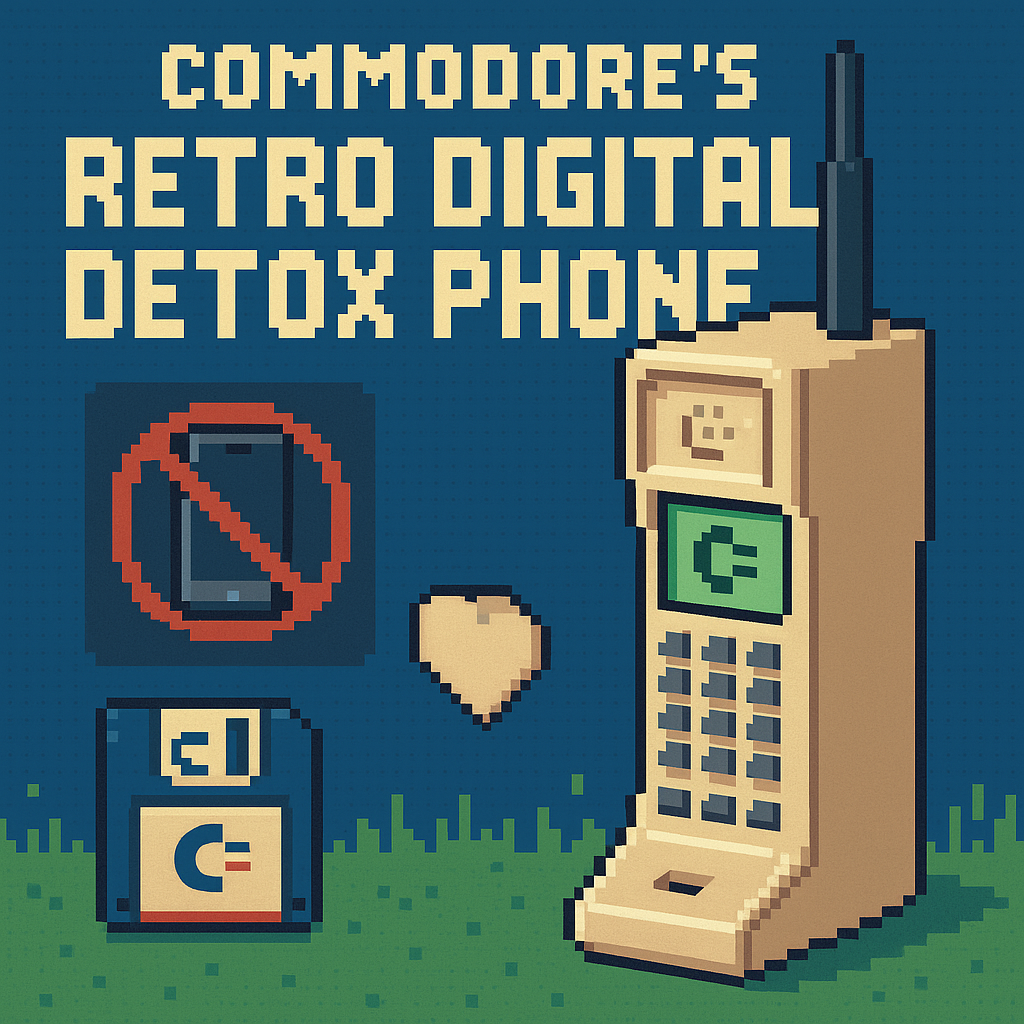
- Commodore’s Callback 8020 digital detox phone threads a new needle: Sailfish OS with Android AppSupport for “need‑to‑have” apps like WhatsApp and Uber, while the OS itself blocks browsers and social media by design. [1][2]
- The real swing market isn’t hipsters; it’s schools and parents adapting to statewide K–12 phone restrictions and porous parental controls—demand that could plausibly reach hundreds of thousands of units even at a $500 price, with U.S. feature‑phone interest rising per Counterpoint. [1][3][4][5][8]
- The product’s fate in the U.S. will hinge on two unsexy hurdles: carrier certification (VoLTE/IMS whitelists) and whether Jolla’s Android layer stays current enough for essential apps over the next 24–36 months. [2][7][9]
What the source said
Wired reports that Commodore—the 1980s computer icon now led by Christian “Peri Fractic” Simpson—built the Callback 8020, a retro flip phone running Sailfish OS that can run selected Android apps like Uber, WhatsApp, and Spotify via Jolla’s AppSupport. Social media, web browsers, email, and Slack are blocked at the OS level to enforce “digital detox,” with T9 typing (or voice transcription), a removable battery, FM radio, a 48 MP Sony sensor with retro camcorder mode, and C64 chiptune ringtones included. Prices start at $500 ($550 clear “Starlight,” $640 Founder’s), preorders open June 30, and shipments target “toward the end of the year.” [1][2]
Why it matters
- Stakeholders one: schools and parents. In 2025–26, at least 11 U.S. states had adopted some form of statewide K–12 student phone restrictions, which creates a procurement and BYOD gray zone where a “school‑legal” phone with enforced guardrails could be attractive. That demand spikes because kids routinely bypass software‑only parental controls on iOS 17 and iPadOS 17, and it’s reinforced by Counterpoint data showing a detox‑driven feature‑phone comeback. [3][4][5]
- Stakeholders two: the Android app ecosystem and carriers. Jolla’s AppSupport makes Android essentials usable on a non‑Android platform, but if API parity lags, users lose mission‑critical apps like ride‑hailing and messaging. Meanwhile, U.S. carriers gate VoLTE, HD Voice, and Wi‑Fi Calling behind model whitelists and IMS provisioning—a common tripwire for niche devices. [2][7]
Original analysis
A 2×2: The detox device matrix
Axis X = App access (e.g., WhatsApp/Uber allowed vs blocked); Axis Y = UX friction (how much the phone slows you down).
|
Low app access (none/very few) |
Essential-only, whitelisted apps |
| High friction (T9, small screens, no feeds) |
Dumb flips (e.g., basic KaiOS devices); cheapest “detox,” but often too limiting for logistics like ride‑hailing. |
Commodore Callback 8020: T9, no browser/social/email, but Uber/WhatsApp/Spotify via Sailfish AppSupport; intentional friction with enough utility. [1][2] |
| Low friction (touch, modern UI) |
Ultra‑locked profiles on iOS/Android rarely hold; kids route around them. [5] |
Light Phone III: larger OLED, touch, minimal tools (timers, maps, etc.), but $799 and more permissive than “no browser at all.” [11] |
Consensus view: “Detox phones are a short‑lived aesthetic fad.” Contrarian read: Hardware‑level and OS‑level constraints beat app‑level toggles—Apple’s Screen Time has seen persistent workarounds, and state ed boards are ratcheting toward bell‑to‑bell bans. The product that pairs a viable app subset with structural friction can endure, because the constraints are harder to bypass and aligned with 2025–26 policy. [4][5]
Back‑of‑the‑envelope TAM
- U.S. public K–12 enrollment was 49.5 million in fall 2023. [8]
- Assume 1.0% of students wind up needing a “school‑legal” phone that truly blocks browsers/social (due to statewide bans or family policy): 0.01 × 49.5M ≈ 495,000 units.
- At a $500 average selling price (ASP), that’s ≈ $247.5M revenue for the category; even a 0.5% penetration implies ≈ 247,500 units and ≈ $123.8M. This dwarfs typical indie‑phone runs and suggests room for two or three players, assuming AppSupport keeps core APIs current. [1][4][8]
Named‑stakeholder breakdown
- Commodore (Christian “Peri Fractic” Simpson): If the company converts retro goodwill from its 2025 C64 Ultimate relaunch into school/parent channels, the Callback can be more than merch—and the margin stack from bundled IEMs and accessories helps. [1][10]
- Jolla (Sailfish OS/AppSupport): This is a marquee validation of AppSupport outside automotive; Jolla must keep Android API coverage modern—its materials emphasize “latest Android APIs,” and Sailfish 5.0 “Tampella” shipped recently—so cadence will be scrutinized. [2][9]
- Light Phone: The Callback’s $500 undercuts Light Phone III’s $799 MSRP while offering a broader app whitelist; Light must defend premium minimalism or build a curated‑apps story to avoid being boxed in as “too limited, too pricey.” [11]
- U.S. carriers (AT&T/T‑Mobile and MVNOs): Success hinges on certified VoLTE/IMS support; AT&T’s “Service Capabilities for Unlocked Devices” shows feature access is model‑ and certification‑dependent, which can strand boutique devices in “data‑only” purgatory. [7]
What others are missing
Coverage fawns over nostalgia and T9, but the hinge is compliance engineering for K–12 districts and parent‑device policies. First, the OS‑level ban on browsers/social matters because kids defeat app‑level toggles; structural blocks close common bypass vectors (Safari, embedded webviews) that Screen Time leaves open in practice. That gives principals and IT leads a tool that aligns with bell‑to‑bell bans adopted in at least 11 states as of April 2025. [4][5] Second, the “Commodore Store based on Aurora” phrasing points to Aurora Store plumbing, which is an unofficial Google Play client on F‑Droid—not a Jolla‑native store—raising governance questions about app whitelists, signature checks, and ToS risk. [1][6]
What to watch next
- By December 31, 2026: At least two additional U.S. states adopt bell‑to‑bell statewide K–12 phone restrictions, expanding the school‑legal device market (trackable via KFF and state ed departments). [4]
- By March 31, 2027: Jolla publicly commits AppSupport on current Sailfish devices to Android 13+ API parity for core apps, with a forward schedule (press/blog or docs; measurable against Android API levels). [2][9]
- By December 31, 2026: Commodore announces a U.S. carrier or MVNO partnership that explicitly lists the Callback 8020 as VoLTE‑certified (checkable via carrier BYOD and capabilities pages). [7]
My take
If Commodore ships what Wired describes—Sailfish plus a hard OS‑level block on browsers/social with an explicit whitelist—the Callback 8020 becomes the first “detox‑but‑capable” phone that isn’t a $799 art object. The bet is well‑placed: schools and parents need stronger controls than toggles kids can bypass, and $500 is palatable if the phone handles rides, messaging, and maps. The pitfalls are prosaic but fatal if ignored: carrier VoLTE certification and AppSupport cadence over 2025–2027. Nail those, and this isn’t cosplay; it’s a viable lane between dumb flips and full smartphones. Miss them, and it’s another beautiful curiosity in a drawer. [1][2][5][7][11]
Sources
- Commodore Made a Digital Detox Phone That Isn’t Dumb — WIRED (https://www.wired.com/story/commodore-callback-8020-is-a-digital-detox-phone-that-isnt-dumb/) — Original report with specs, prices, OS blocking model, and preorder/shipping window.
- Android AppSupport | Sailfish OS Documentation — Jolla (https://docs.sailfishos.org/Support/Help_Articles/Android_App_Support/) — Confirms how Sailfish runs Android apps via Jolla’s AppSupport layer.
- US Feature Phone Market Stages Comeback as Gen Z, Millennials Advocate Digital Detox — Counterpoint Research (https://counterpointresearch.com/insight/us-feature-phone-market) — Evidence of U.S. “detox” interest and the feature‑phone market’s resilience.
- A Look at State Efforts to Ban Cellphones in Schools and Implications for Youth Mental Health — KFF (https://www.kff.org/mental-health/issue-brief/a-look-at-state-efforts-to-ban-cellphones-in-schools-and-implications-for-youth-mental-health/) — State‑by‑state policy snapshot showing at least 11 states with restrictions as of April 2025.
- Screen time: Children can easily bypass app limits in iOS 17 and iPadOS 17 — heise online (https://www.heise.de/en/news/Screen-time-Children-can-easily-bypass-app-limits-in-iOS-17-and-iPadOS-17-9816215.html) — Documents persistent workarounds that undermine software‑only parental controls.
- Aurora Store | F‑Droid (https://f-droid.org/en/packages/com.aurora.store/) — Establishes Aurora Store as an unofficial, open‑source Google Play client (not a Sailfish‑native store).
- Service Capabilities for Your Unlocked Device (PDF) — AT&T (https://www.att.com/idpassets/images/support/pdf/Service-Capabilities-Unlocked-Devices-ATT-Network.pdf) — Shows that feature access (HD Voice/VoLTE, Wi‑Fi Calling) is model‑ and certification‑dependent.
- NCES Data Show Public School Enrollment Held Steady Overall From Fall 2022 to Fall 2023 — NCES (https://nces.ed.gov/whatsnew/press_releases/12_5_2024.asp) — Provides the 49.5 million public K–12 enrollment figure used in the TAM math.
- Sailfish OS 5.0 “Tampella” is here! — Jolla Blog (https://blog.jolla.com/sailfish-os-5-0-tampella-is-here/) — Confirms active development and recent major Sailfish release cadence.
- The Commodore 64 Ultimate computer is the company's first hardware release in over 30 years — Tom’s Hardware (https://www.tomshardware.com/video-games/retro-gaming/the-commodore-64-ultimate-computer-is-the-companys-first-hardware-release-in-over-30-years-pre-orders-start-at-usd299) — Corroborates the brand’s 2025 reboot under Christian “Peri Fractic” Simpson.
- The Light Phone 3 is here with miniature features, massive $799 price tag — Android Central (https://www.androidcentral.com/phones/the-light-phone-3-is-here-with-miniature-features-massive-usd799-price-tag) — Confirms Light Phone III’s pricing and minimalist positioning for comparison.
Related update: We recently published an article that expands on this topic: read the latest post.
It was one of those weeks where every day felt like a Monday. You know the type. Between juggling work calls and the mountain of laundry that seemed to multiply overnight, the last thing I wanted was to spend hours in the kitchen. I needed something quick, something fresh, and something that wouldn't leave me feeling like I needed a nap right after eating. Enter: Quinoa Tabbouleh Salad. This dish is not just a salad; it's a vibrant, zesty bowl of goodness that magically makes everything seem a little more manageable. It's the kind of recipe that you can whip up with minimal fuss, yet it feels like a treat. Plus, it packs a punch with its medley of herbs and veggies, making it the perfect dish to reset your taste buds.
Jump to Recipe
What You'll Need
Honestly, the beauty of this recipe is in its simplicity. Chances are, you already have most of these ingredients lounging in your pantry or fridge. Here's what you need to gather:
- 1 cup quinoa
- 2 cups water
- 4 green onions, finely chopped
- 1 large diced tomato
- 1 diced cucumber
- 1/4 cup fresh mint, chopped
- 1/2 cup fresh parsley, chopped
- 1/4 cup olive oil
- Juice of 2 lemons
- 1 teaspoon garlic powder
- Freshly cracked black pepper to taste
How to Make Quinoa Tabbouleh Salad
- Start by bringing the water to a boil in a medium saucepan. Once boiling, add the quinoa and give it a quick stir.
- Reduce the heat to medium-low, cover, and let the quinoa simmer. Keep an eye on it and stir occasionally to prevent sticking. It's done when all the water is absorbed, which should take about 20 minutes.
- Once cooked, remove the quinoa from the heat and allow it to cool completely. This step is key to a good salad texture.
- In a large bowl, combine the cooled quinoa with the green onions, diced tomato, and cucumber.
- Next, toss in the fresh mint and parsley. The aroma will be undeniably refreshing.
- Drizzle the olive oil and lemon juice over the mixture, then sprinkle with garlic powder and cracked black pepper. Stir gently until everything is well-mixed.
- Cover the bowl and refrigerate for at least an hour. This lets the flavors meld beautifully.
- Just before serving, give it one last gentle stir. Enjoy how the textures and flavors come together in each bite!
Cook's Notes
Quinoa can be a bit tricky if you’re not careful. Make sure to keep an eye on it while it's simmering to avoid any burning or sticking at the bottom of the pan. If you're a time-crunched cook like me, prepping the veggies while the quinoa cooks can save you those precious minutes. As for storing, this salad tastes best on the first day when everything is crisp. But if you're lucky enough to have leftovers, they'll hold up well in the fridge for two to three days. Just be sure to give it a good stir before diving back in.
Make It Your Own
Here’s where you can let your creativity shine. Try these variations to put your personal spin on the dish:
- Swap the quinoa for bulgur for a more traditional take on tabbouleh.
- Add some crumbled feta for a creamy contrast to the fresh veggies.
- Throw in some chopped kalamata olives for a briny kick.
- For a protein boost, mix in some chickpeas or grilled chicken pieces.
If you try this, I'd love to hear how it turns out — drop a comment or tag me! Whether it becomes a staple in your meal prep or a go-to for potlucks, this Quinoa Tabbouleh Salad is all about keeping it simple and satisfying. Happy cooking!
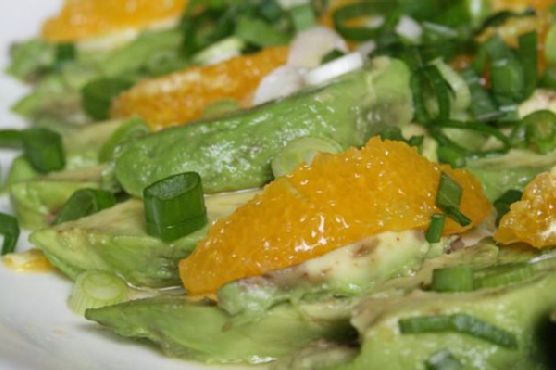
It was one of those days where I stood in front of the open fridge, hoping dinner would magically appear. You know the type, right? The sun had made a surprise appearance after a string of dreary days, and suddenly all I wanted was something fresh, vibrant, and maybe a little unexpected. That’s when the neglected oranges rolled into view, nestled next to a couple of perfectly ripe avocados. Bingo! Avocado and Orange Salad with Orange-Ginger Dressing was on the menu. It’s a salad that feels like sunshine on a plate — quick to prepare, yet impressive enough that you’ll feel like you’ve done something special. It’s got that killer combo of creamy and tangy, with the zing of ginger giving it an extra twist. Seriously, this salad is a game-changer for those nights when you want something different but can’t be bothered with too much fuss.
Jump to Recipe
What You’ll Need
This salad is all about the ingredients speaking for themselves. Chances are you already have most of this hanging around your kitchen.
- Avocados – ripe but still firm
- Oranges – sweet and juicy
- Green onions
- Orange juice – fresh is best
- Lemon juice
- Fresh ginger paste
- Agave syrup
- Olive oil
- Salt and pepper
How to Make Avocado and Orange Salad With Orange-Ginger Dressing
- Start by peeling your oranges. Cut them into segments, saving any extra juice for the dressing. Arrange the orange segments and avocado slices so they’re overlapping slightly on a platter. It should look effortlessly gorgeous.
- Take the leftover orange carcass and give it a good squeeze all over the salad, letting that sweet juice mingle with the creamy avocado. This is what dreams are made of.
- Next, slice up some green onions and sprinkle them over the salad. A pinch of salt here too to bring everything together.
- Cover the platter with cling film and pop it in the fridge. Let it chill out until you’re ready to serve.
- For the dressing, blend together orange juice, lemon juice, fresh ginger paste, agave syrup, and olive oil. Make sure to taste it — you want it balanced, so add salt and pepper as needed.
- Right before serving, pour the dressing generously over the salad. Watch as it glistens and coats everything beautifully, inviting you to dig in.
Cook’s Notes
If you’re prepping this ahead of time, keep the salad and dressing separate until you’re ready to serve. The citrus will keep the avocados from browning, but it’s always best fresh. Leftovers can be stored in the fridge for a day, but the avocados might get a bit soft. I recommend making just enough for the meal to keep everything at its peak. One more tip: make sure the ginger paste is as fresh as possible — it’s key to that lovely zing!
Make It Your Own
- Swap out the green onions for thinly sliced red onions if you prefer a bit more bite and color.
- Add some toasted almonds or walnuts for crunch. They pair beautifully with the creamy avocado.
- If you’re feeling adventurous, try adding thin slices of fennel for a mild anise flavor and an extra bit of crunch.
- For a bit of spice, sprinkle some chili flakes over the salad before drizzling with the dressing.
If you try this, I’d love to hear how it turns out — drop a comment or tag me! There’s something about this salad that just feels like a little bit of sunshine in a bowl, and I hope it brings some brightness to your table too. Enjoy, friends!
Related update: Avocado and Orange Salad With Orange-Ginger Dressing
Related update: Citrus Arugula Salad with Seared Scallops